
If you’ve worked with Git long enough, you’ve probably heard this debate:
“Should we use git merge or git rebase?”
Both commands combine changes from different branches, but they do it in very different ways. Understanding the difference is essential for clean history, fewer conflicts, and safer collaboration.
This post explains when to use each, with mental models that actually stick.
The Core Difference (TL;DR)
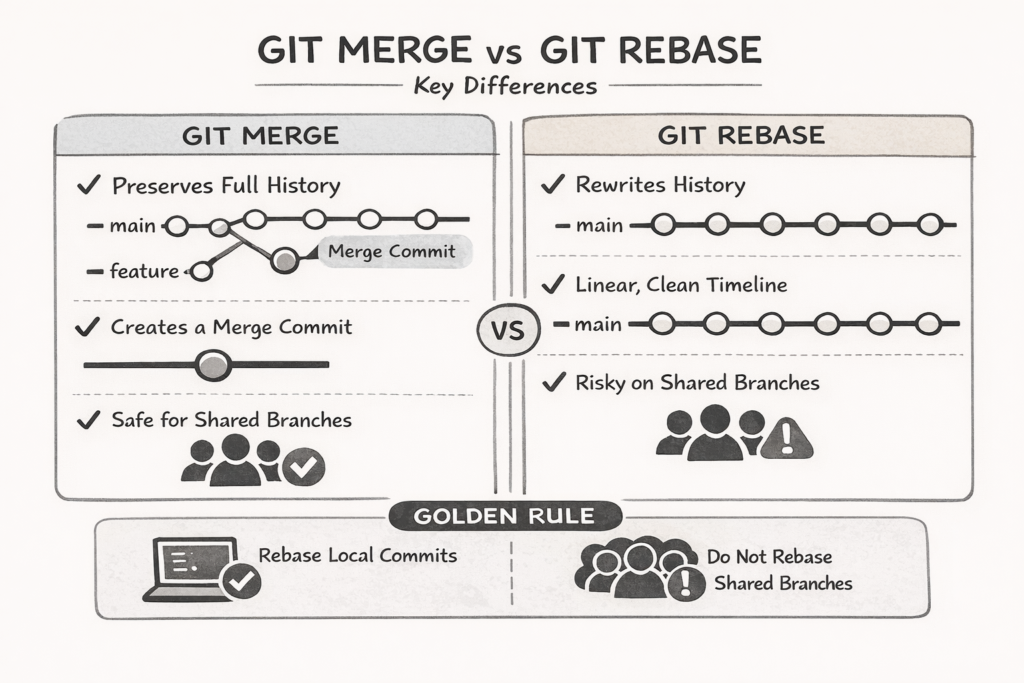
- Git merge preserves history
- Git rebase rewrites history
That single difference explains almost everything else.
Git Merge: Preserve What Happened
When you merge, Git creates a merge commit that ties two branches together.
What this means
- The full branch structure is preserved
- You can see exactly when branches diverged and merged
- History reflects reality, not aesthetics
Example
git checkout main
git merge feature
Pros
- Safe for shared branches
- No history rewriting
- Easy to reason about in teams
Cons
- History can get noisy
- Many merge commits in long-lived repos
When to use merge
- Merging into
mainordevelop - Working with multiple collaborators
- Any branch that others have already pulled
Git Rebase: Rewrite for Clarity
Rebasing takes your commits and replays them on top of another branch.
What this means
- Commit hashes change
- History becomes linear
- Git pretends your work started later than it actually did
Example
git checkout feature
git rebase main
Pros
- Clean, linear history
- Easier
git log - Great for polishing work before merging
Cons
- Dangerous on shared branches
- Can cause problems if misused
When to use rebase
- Updating your local feature branch
- Cleaning up commits before opening a PR
- Working alone on a branch
The Golden Rule of Rebase
Never rebase commits that other people have already pulled.
Why?
Because rebasing changes commit history.
If someone else has the old commits, Git will get confused — and so will your teammates.
If you must push after rebasing:
git push --force-with-lease(--force-with-lease is safer than --force)
To read w
Merge vs Rebase: How Conflicts Feel
| Situation | Merge | Rebase |
|---|---|---|
| Conflicts | Happen once | Happen per commit |
| Resolution | One big fix | Smaller, repeated fixes |
| Undo | Easy | Requires care |
Rebase conflicts feel harder at first, but they force you to fix issues commit by commit, which often leads to better code.
A Practical Workflow That Works
Here’s a simple, safe approach many teams use:
While developing
- Rebase your feature branch on
main
git fetch origin git rebase origin/mainWhen ready to integrate
- Merge the feature branch
git checkout main git merge featureThis gives you:
- Clean feature history
- Safe shared history
- Fewer surprises
Final Thoughts
- Use merge to be safe
- Use rebase to be clean
- Use both intentionally
Git isn’t about choosing sides — it’s about choosing the right tool for the situation.
If you understand how history changes, you’ll stop fearing both commands.
